




A9G Pudding GPRS GSM+GPS BDS Development Board SMS Voice Wireless Price in Pakistan
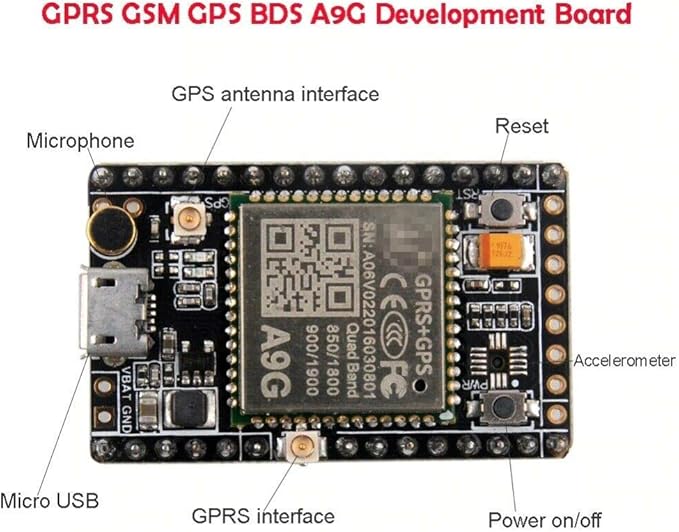
- The A9G development board is a multi-functional development board based on A9G GPRS / GSM + GPS / BDS module that can be used to verify the basic communication functions and peripheral functions of the A9G module.
- A9G development board with the basic phone / SMS, GPRS networking communications, GPS / BDS dual-mode positioning.
- A9G development board contains a lithium battery charging management, microphone, speaker interface, USB communication interface, multiple user keys / led, TF card slot, acceleration sensor, SPI interface, I2C2 interface, ADC interface.
- Support an external 30W / 200W camera on A9G development board camera expansion board,
- Support an external conventional slot machines on A9G development board slot machine expansion board.
Possible application:
- Vehicle immobilizer using GPRS + GPS, as well as accelerometer.
- Remote monitoring intercom using GSM and microphone / speakers
- Smart watch with 1.54 “capacitive touch screen using GPRS / GSM + GPS
- Use GPRS / GSM + GPS, heart rate sensor, 1.54-inch capacitive touch screen monitor the elderly care
- Remote monitoring camera using GPRS + TF + camera extension board
- Wechat payment slotting scheme using slot extension board
- Custom devices based on Lua programming using onboard functions
Package of development board
- Main development board, accelerator IC is not placed on board.
- GPS/GPRS antenna, and GPS/BGS antenna.
Quick Start Guide
Basic debugging: wiring
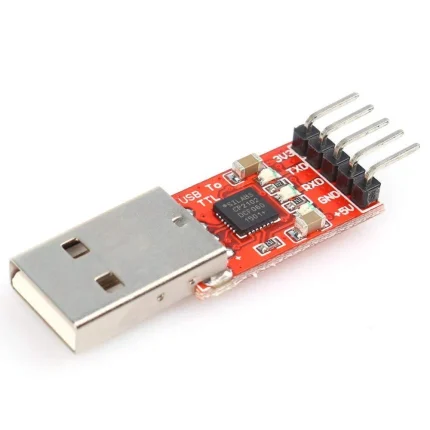
- Development board using the AT firmware, when used in debugging 4-wire connection usb-ttl, connected to the computer debugging: VUSB → 5V; GND → GND; AT_TX → RX; AT_RX → TX;
- Or use the USB power supply, and then another three lines GND → GND; AT_TX → RX; AT_RX → TX;
- Or lithium battery VBAT → (3.3v-4.2) V; GND → GND; AT_TX → RX; AT_RX → TX; (VBAT power supply, need to press power_key button for about 2s)
Power-on
- A9G development board can use lithium battery or USB power supply.
- Power 1 ~ 2S module automatically run, this time the serial port will automatically output information. The entire power to the development board to work properly does not require any operation.
- To reset, press the Rst_Key button.
- The module enters AT command mode by default.
Initilization
- Under normal circumstances, the module power-on initialization is completed flag is + CIEV: READY, the actual module at initialization time requested data from the base station, will issue the date, time zone and time zone information, due to network r





Reviews
There are no reviews yet.